What is this blog talking about?
Doing projects is perhaps the most effective way to build up our knowledge and experience in any fields, especially disciplines that require a large amount of practical experience to get better. Since all of my projects are entirely about machine learning, deep learning and AI in general so today I would like to share some of my experience along the way. Some of them I have learnt the hard way (wasting tons of time waiting, tons of GPU quota, frustrated through many days, $\dots$), so I think documenting them at somewhere should help me in the future review easier to not make the same mistake again and to also demonstrate my own learning journey. Just applying Feynman’s technique by the way, let’s go.
Using wrapper model
While I was doing my project on detecting AI or human generated code, I used a technique called Stochastic Weights Averaging. This technique allows us to intervene the update parameters process of the optimizer and gradually change the weights of the model more stably and with stronger momentum on old model weights. This helps us to boost generalization of the model, prevent overfitting and control the training stability. More details about this technique can be found online. Thing I want to say is that the torch library already provide us with very nice torch.optim.swa_utils and its corresponding AveragedModel to help us cut out the boilerplate code of setting this technique. But after calling AveragedModel to wrap the model, we should notice that the model (especially if you are using transformers library) no longer contains save_pretrained method that HuggingFace provides us. This is due to it wraps the model inside thus only the model inside has this method. Therefore, we should check whether we have unwrap the model inside to get the real method, since the outer wrapper does not contain this method and would potentially fail to save the checkpoints. This is a small experience but could eat a lot of your training time meaninglessly especially if we are not careful enough to do functional testing before constructing large training process.
Not unwrapping model enough
Following the aforementioned note on unwrapping model to get the real model, sometimes there is an interesting phenomenon happening. The model we are using to train may be wrapped inside a model which is also wrapping another model inside it. This wrapping loop may lead to several models wrapping the other creating a stack of wrapper on some base model. Therefore, to robustly unwrap fully the real model and call the methods we expect (save_pretrained, from_pretrained, $\dots$), we might want to use while loop to continuously unwrap them until we find no such module inside the current model since the outer wrapper retrieve the inner model through this attribute. Here is some code snippet we might want to take a look:
    def _unwrap_model(self, model):
        try:
            return self.accelerator.unwrap_model(model)
        except (AttributeError, TypeError):
            # Recursively remove .module wrappers (DataParallel, DDP, etc.)
            while hasattr(model, 'module'):
                model = model.module
        return model
Let’s read the snippet line by line to get what it was doing:
-
First, we will try to unwrap the inner model using high-level API provided by
acceleratelibrary, which is a fantastic library for distributed training and inference especially if we are doing with large models and datasets. This method allows us to natively get the inner model without worrying anything about the inside mechanisms. -
But if the
acceleratorfailed to unwrap it, we might want another more manual solution. Conventionally, we use the keywordmoduleto access the inner model (as said before). Therefore, we would use awhileloop to iterate until there is no attribute namedmoduleinside the current model, then we stop, otherwise continue unwrapping until the stop condition is met. -
Finally, return the actual model inside those layers of wrappers.
Saving model with tokenizer
If we are doing NLP projects, especially those model we shamelessly load from HuggingFace, we might discover that the folder we got from the notorious from_pretrained method actually consist more files than we expect. Beside the model.safetensors which contains the real weights of the main model, there are several other files that are indispensable for our workload to load and run training/inference properly with the loaded model. Here is a capture of a typical folder we found on HuggingFace for language model:
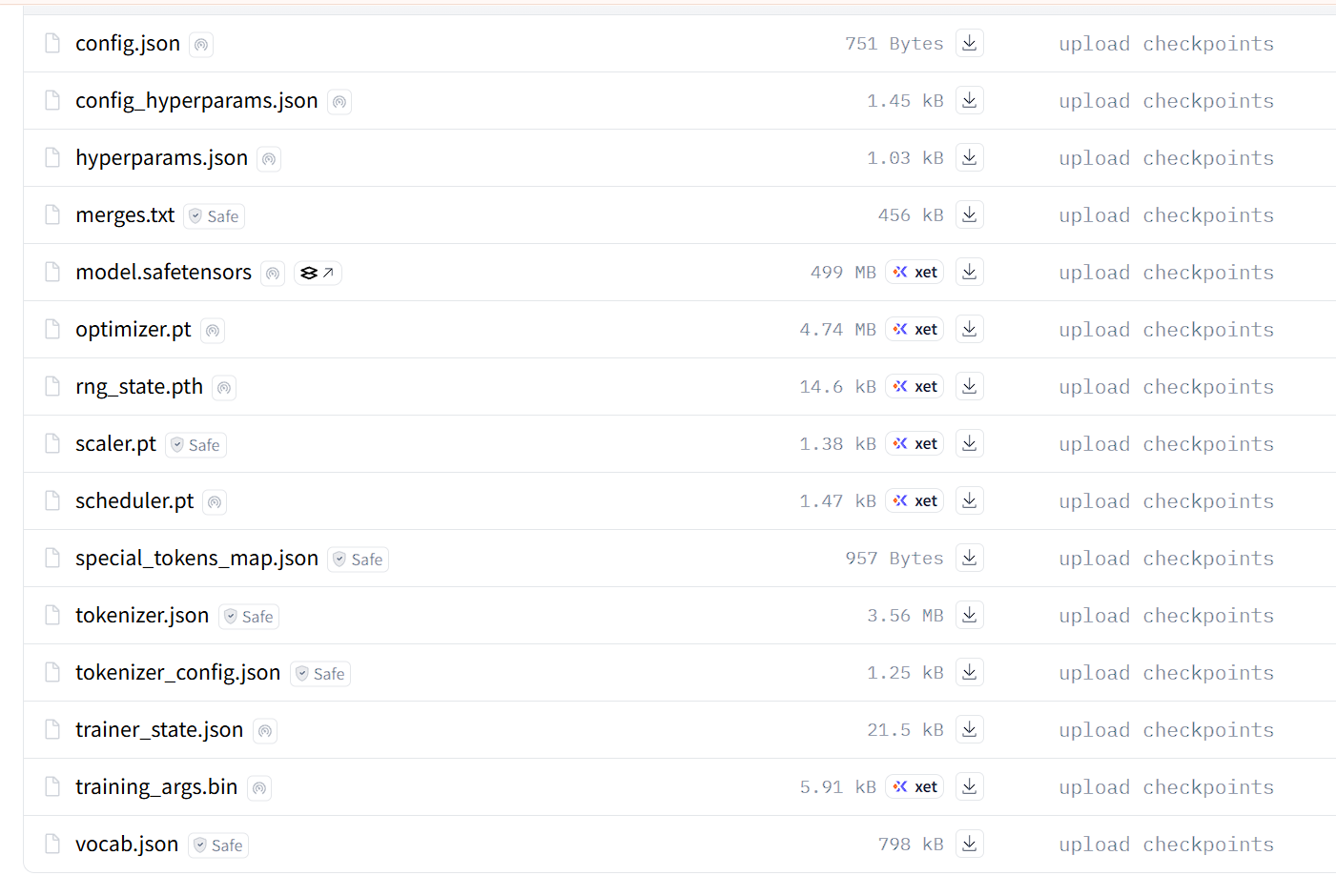
Wow, there are a lot of files here. Among them, I actually added some more to manage the experiments easier with more information on things like hyperparameters, training configurations, etc. Now we should look at some of those:
-
Model checkpoint:
model.safetensorscontains all parameters in dictionary format. This file is named safe because it only stores weights as dictionaries, rather than as execution flow. Therefore, this file does not know anything about the model architecture, it only knows that there is something calledself.attention.query.1.weights = torch.Tensor([1, 2, 3, 4, 5, 6]), there is no way for this file to be executed unwantedly on your machine $\rightarrow$ safety is obtained. -
Configurations:
config.json, config_hyperparams.json, training_args.bin. These files are accounted to contains configurations information about the training process. They contains information on how the model architecture is like to initialize the model so that weights can be loaded into it properly. Also there are hyperparameters as noticed and some other training arguments if you wish to save more information for tracking. -
Tokenizer:
tokenizer.json, merges.txt, special_tokens_map.json, tokenizer_config.json, vocab.json. These files contains important configurations and information about the tokenizer that do the justice of tokenization before actually passing tensors to the model. These files are especially easy to miss in highly manually training process since you might forgot to save the pretrained tokenizers along with the model, which makes the inference phase impossible due to insufficient necessary information. My advice: always ensure these guys appear in your checkpoint folders, otherwise our time of waiting would be mercilessly wasted. -
Training State:
optimizer.pt, rng_state.pth, scaler.pt, scheduler.pt. These files contain the training state, especially if your training is not finished. They store the current state of the optimizers (since some optimizers such as Adam store data about the historical gradients and its squares), random number generator (to ensure reproducibility for other researchers), scaling state (in case we are doing dirty with gradients scaling under the hood is mixed precision training is activated) and scheduler state (if our learning rate get scheduled over time using cosine decay or linear decay algorithms). Without these files, every time you resume training is entirely different scenarios because all states would be reset to its original state at initialization. Reproducibility in this context would be impossible since the training process is becoming messy than ever.
Always have degeneration detection in your NLP projects
Last semester I worked with a small looped language model named Ouro-1.4B Thinking model by ByteDance. During the work, I encountered one of the most annoying issue is that the model unexpectedly and continually generate degeneration output that looks like total garbage tokens. At the time, I have proposed several ideas that may be the culprit behind the scene:
- Data type: Since the Kaggle environment use GPU T4 (which is a very old version of GPUs compared to modern ones), it doesn’t support the data type bfloat16 which has been the industry standard of nearly all LLMs these days. Therefore, when trying to use bfloat16 in my coding, I actually had no idea how the environment handles that mismatch data type, since all the runs have been conducted successfully without errors but the documentation said it supposed to be error. Maybe there were silent errors that I just didn’t grasp at the time.
- The novel generation mechanism: Since all basic language model people in NLP encounter in their first projects are all linear transformers model, which means they only process the input text one-way from the start to the end. They have no loops like this one. Therefore, I suspected that the degeneration output might results from this novelty in its text processing mechanism.
- Small number of parameters: Since the model I chose to use at that time only has 1.4 billion parameters, this limited capacity might affect the model’s performance, since we all know that more parameters lead to broader capabilities. Therefore, this could also be a prominent factor that leads to such horrible results in the model output. I also found that the model struggles with following exactly the answer format denoted in the system prompt, its instruction following abilities are kind of weak, perhaps due to the insufficient of training on the SFT phase.
Therefore, since our financial power is not unlimited, waiting the model to generate its answers for several hours only to get garbage generation contains only garbage tokens is catastrophically expensive. This gold experience has lead me to believe that having a mechanism to detect whether the current generation is bad or not is an indispensable responsibility of anyone doing NLP projects. There are several strong and classical algorithms for string comparison are perfectly match for this task and we can vibe them out using our friendly agents like ChatGPT or Claude.
Aware with different backends between interactive and background Kaggle
Kaggle is our friendly companion when it comes to free GPUs quota with generous 30 hours of free tier per week. Since there are two modes for a Kaggle notebook to run on: the interactive session and the background session. I was painfully aware that these backend computing environments are quite different from each other. It seems to me that the interactive session has a slightly more benevolent reaction on runtime errors, while background session is prohibitively strict on these errors. There was a time I have to use the library protobuf alongside with some library in the code for the language models mentioned before, things happened when installing new version of protobuf, there are some modules or classes which are deprecated and no longer in the library code. The interactive session kindly tells me about this error in the console log but continue to run normally without any more errors. But when I run the notebook in background session, the errors are not allowed to pass in and immediately get caught and the whole notebook session has been terminated painfully due to its strict backends. Following the Google search, I learn that the backend they use for the background session is named Papermills. Below is the message error I got:
AttributeError: 'MessageFactory' object has no attribute 'GetPrototype'