A few months back, while downloading a new model from Hugging Face to experiment with, I noticed something interesting: the repository offered both the classic model.pth (the traditional PyTorch weight storage format) and a newer model.safetensors. At first glance, they seemed identical, just having different extensions. However, when I loaded the Safetensors version, it felt noticeably faster, and I recalled reading about security concerns associated with the older format that time I still didn’t understand.
That subtle difference sparked my curiosity. Why do we have so many ways to save model weights? And why is the machine learning community suddenly pushing Safetensors as the new standard? Initially, the .safetensors extension seemed a bit unusual to me, yet its highly descriptive name was captivating. Let’s tackle all of these simultaneously.
Pickle vs. PyTorch
For years, PyTorch has relied on Python’s pickle module to serialize models. You save a model’s state_dict (or even the entire model) using torch.save(), and load it back with torch.load(). These files usually end in .pt or .pth. The extension itself does not matter; it is merely a convention although the community have preferred the .pt these days for clarity. Similarly, if you work with traditional machine learning models trained via the scikit-learn library, you have likely encountered the .pkl format, which is the standard extension for pickled model weights.
This approach is incredibly flexible. You can store not only weights but also optimizer states, training metadata, and custom objects, pretty much anything Python can pickle. This flexibility is why so many research checkpoints have relied on .pth files for years.
However, this flexibility comes at a cost: security. Pickle is fundamentally unsafe when loading files from untrusted sources, as a malicious file can execute arbitrary code upon loading. PyTorch has recently introduced a weights_only=True flag to mitigate this, and if you work with PyTorch, you have undoubtedly seen the associated warnings when saving or loading models (I got this a lot in my life). While saving models with a .pth suffix is perfectly fine for verified, trusted environments, a significant risk remains when dealing with models shared online.
Enter Safetensors
Hugging Face created Safetensors to solve exactly these problems. It is a simple binary format designed to store only tensor state dictionaries (the weights) and basic metadata. Simply put, .safetensors files only store a dictionary where the keys are the model’s parameter names and the values are their respective numerical weights after training or fine-tuning.
The file structure is remarkably straightforward:
- A small JSON header describing tensor names, shapes, data types, and offsets.
- The raw tensor data, laid out contiguously.
Because there is no executable code involved, loading a Safetensors file cannot run malicious scripts. It is secure by design.
It also brings substantial performance benefits. Safetensors supports zero-copy loading and memory mapping, meaning large models load much faster and with lower peak memory usage. For massive architectures like Llama or Stable Diffusion, this can shave off significant loading time.
Hugging Face now defaults to Safetensors for new uploads, and many older repositories offer both formats side by side.
Here is a visual representation of the internal structure of a Safetensors file:
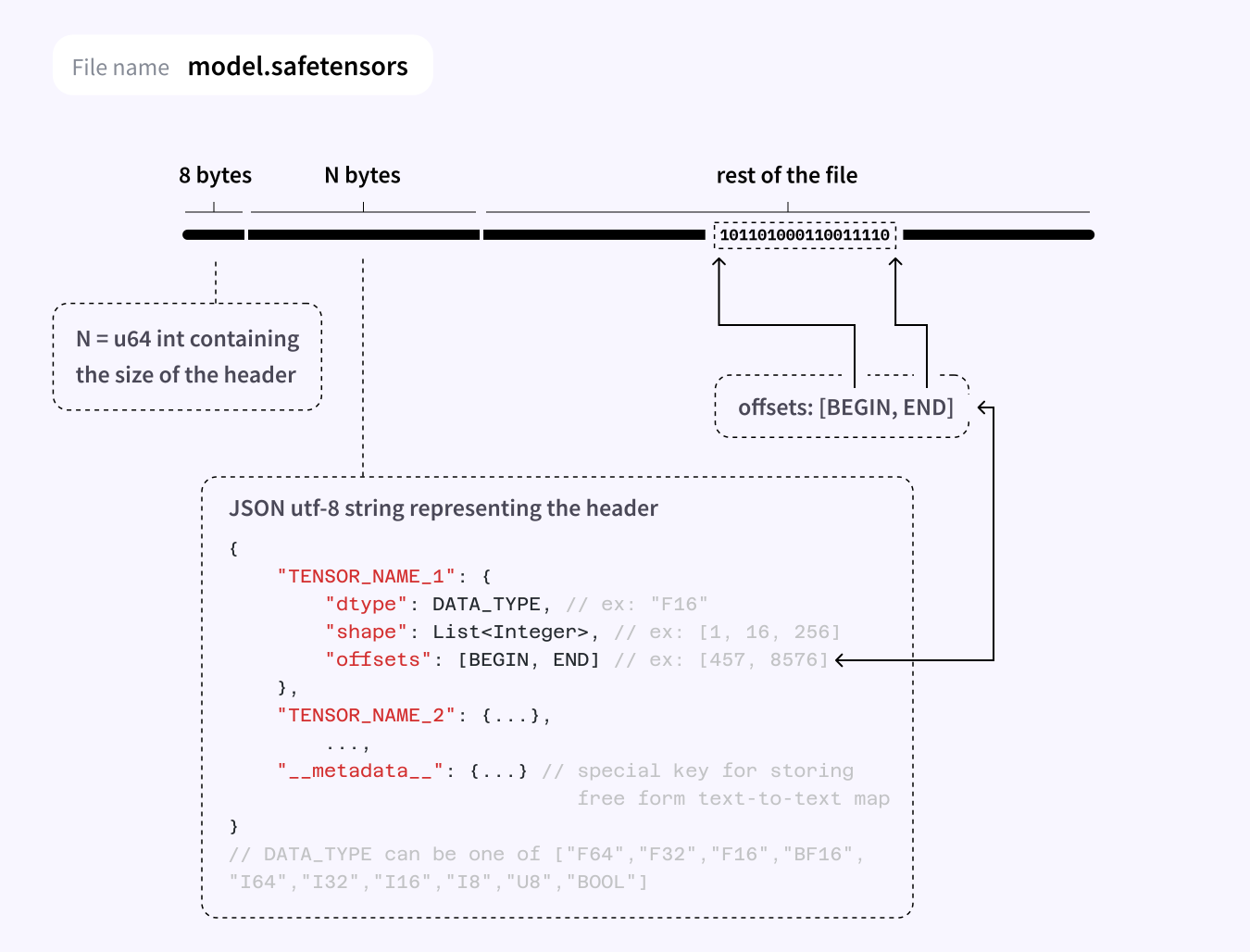
As the diagram illustrates, the format consists of three distinct parts:
- An 8-byte (64-bit unsigned integer) prefix denoting the size of the metadata section in bytes.
- The metadata section, which stores a JSON dictionary outlining the data type, shape, and byte offsets for every tensor in the model.
- The final section, which contains the raw, contiguous byte data for the tensors themselves.
The Keras and TensorFlow World
On the other side of the ecosystem, Keras and TensorFlow have traditionally used .h5 (HDF5) files. These are hierarchical, acting much like a file system inside a single file, and can store the entire model including architecture, weights, optimizer state, and training configuration—in one convenient package.
The .h5 format is generally safer than pickle because it does not execute arbitrary code during loading. While not entirely perfect (older versions of the HDF5 library have had vulnerabilities), it is tightly coupled to the TensorFlow/Keras ecosystem and widely utilized.
Recently, Keras has shifted toward the newer .keras format (a zip archive containing a JSON config and the model weights), but .h5 remains commonplace for legacy compatibility.
ONNX: Shared Weights Between Any Platform
Then there is ONNX (Open Neural Network Exchange), the ultimate format striving to make models framework-agnostic.
ONNX is an open standard that defines a common representation for neural networks. You can export a model trained in PyTorch, TensorFlow, or JAX into the ONNX format (usually with an .onnx extension) and then run that same file across various runtimes: ONNX Runtime, TensorRT, OpenVINO, TVM, and even in web browsers via ONNX.js.
The primary promise of ONNX is portability. You can train a model in PyTorch, export it to ONNX, and deploy it on an edge device using ONNX Runtime or optimize it with NVIDIA TensorRT.
What is inside an ONNX file? It contains:
- The computational graph (operators and connections).
- The weights (tensors).
- Metadata regarding inputs, outputs, opset versions, and more.
Because it is a self-contained graph and weights format, it is generally safe to load, with no risk of arbitrary code execution like pickle. However, the exact security profile depends on the runtime you use to execute it, as some runtimes have patched vulnerabilities in the past.
Are there trade-offs? Yes. Exporting to ONNX can sometimes be lossy. Not every custom operation or PyTorch-specific behavior survives the conversion perfectly. You often need to test thoroughly, especially when dealing with newer models or highly complex architectures.
Still, for many standard models (such as Transformers, CNNs, and Diffusion models), ONNX export works exceptionally well and is increasingly supported by Hugging Face via the Optimum library (optimum.exporters.onnx).
Once your model is stored in the .onnx format, you can use the excellent Netron App to render its computational graph. This visualization tool is invaluable for tracking data flow and understanding the network architecture as a whole.
Comparison
Here is how these formats stack up:
- Safetensors (.safetensors)
- Security: Excellent (no code execution possible).
- Speed: Very fast, zero-copy, and memory-efficient.
- Flexibility: Stores only tensors (architecture must be defined separately).
- Portability: Mostly used within the PyTorch and Hugging Face ecosystems, though dedicated libraries exist to facilitate saving and loading.
- Best for: Sharing models publicly and achieving fast inference loading.
- PyTorch .pt / .pth (Pickle)
- Security: Risky when used with untrusted files.
- Speed: Slower due to extra memory copies and Python overhead.
- Flexibility: Highest (can store virtually anything).
- Portability: Limited to PyTorch.
- Best for: Internal training checkpoints within trusted environments.
- Keras .h5
- Security: Good (no arbitrary code execution).
- Speed: Decent, though it lacks zero-copy capabilities.
- Flexibility: Stores the full model structure and weights in one file.
- Portability: Limited to the TensorFlow/Keras ecosystem.
- Best for: Standard Keras and TensorFlow workflows.
- ONNX (.onnx)
- Security: Generally good (dependent on the execution runtime).
- Speed: Highly variable depending on the runtime (can be extremely fast with optimized engines).
- Flexibility: Stores both the computational graph and weights.
- Portability: Excellent (runs across many hardware platforms and runtimes).
- Best for: Cross-framework deployment, edge devices, and production inference.
Final Thoughts
Model formats might seem like a minor implementation detail, but they sit right at the crucial boundary between research and real-world deployment. The shift toward Safetensors has made open-source sharing significantly safer and faster, while ONNX has made deployment remarkably flexible. Together, they are quietly reshaping how we interact with open-source AI.
Because of the interconnected nature of modern research, public models are ubiquitous on Hugging Face. If you have an idea, chances are there is already a pre-trained model waiting to be discovered. In a massive open ecosystem like this, our focus can no longer solely be on model performance or storage size; we must also prioritize security when loading public models. This is exactly why the Safetensors format shines so brightly today.