A few months back, while downloading a new model from Hugging Face to experiment with, I noticed something interesting: the repository offered both the classic model.pth (the traditional weights storage format in pytorch) and a newer model.safetensors. At first glance, they seemed identical—just different extensions. But when I loaded the safetensors version, it felt noticeably faster, and I remembered reading about some security concerns with the older format.
That small difference sparked my curiosity. Why do we have so many ways to save model weights? And why is everyone suddenly pushing safetensors as the new standard? At first, in my earlier days of working with Huggingface Models repository, I found that the suffix .safetensors is somwwhat strange but captivating due to its expressive fashion. Then, of course, there’s ONNX—the format that promises to let your model run almost anywhere. So let’s add it to the conversation.
Pickle vs PyTorch
For years, PyTorch has used Python’s pickle module to serialize models. You save a model’s state_dict (or even the entire model) with torch.save(), and load it back with torch.load(). The files usually end in .pt or .pth—the extension doesn’t matter; it’s just convention. Or if you are working with traditional machine learning models that created and trained with scikit-learn library, you might have encountered the basic format .pkl which is the original suffix for pickle format for weights storage of the model.
This approach is incredibly flexible. You can store not only weights but also optimizer states, training metadata, custom objects—pretty much anything Python can pickle. It’s why so many research checkpoints use .pth files for a long time.
But flexibility comes with a cost: security. Pickle is not safe when loading files from untrusted sources. A malicious file can execute arbitrary code during loading. PyTorch has added a weights_only=True flag in recent versions, you will definitely meet this warnings when working with pytorch. I have met it myself no less than 10 times and still remember the familiar warnings any time I save or load my models after training. Saving models with suffix .pth is still fine for already safe and well-verified model weights but the risk remains when dealing with models shared online.
Enter Safetensors
Hugging Face created safetensors to solve exactly these problems. It’s a simple binary format designed to store only tensors state dictionaries (weights) and basic metadata—no arbitrary code, no Python objects. To make things simpler, .safetensors only store the dictionary that contains keys as the parameters name in the model and values are their respective numerical value after training or finetuning.
The file structure is straightforward:
- A small header (JSON) describing tensor names, shapes, dtypes, and offsets.
- The raw tensor data laid out contiguously.
Because there’s no executable code involved, loading a safetensors file cannot run malicious scripts. It’s secure by design.
It also brings performance benefits. Safetensors supports zero-copy loading and memory mapping, meaning large models load faster and with lower peak memory usage. For huge models like Llama or Stable Diffusion, this can shave off significant time—sometimes 2-10x faster than pickle.
Hugging Face now defaults to safetensors for new uploads, and many older repositories offer both formats side by side.
We can look at what does the format look like inside a safetensors file:
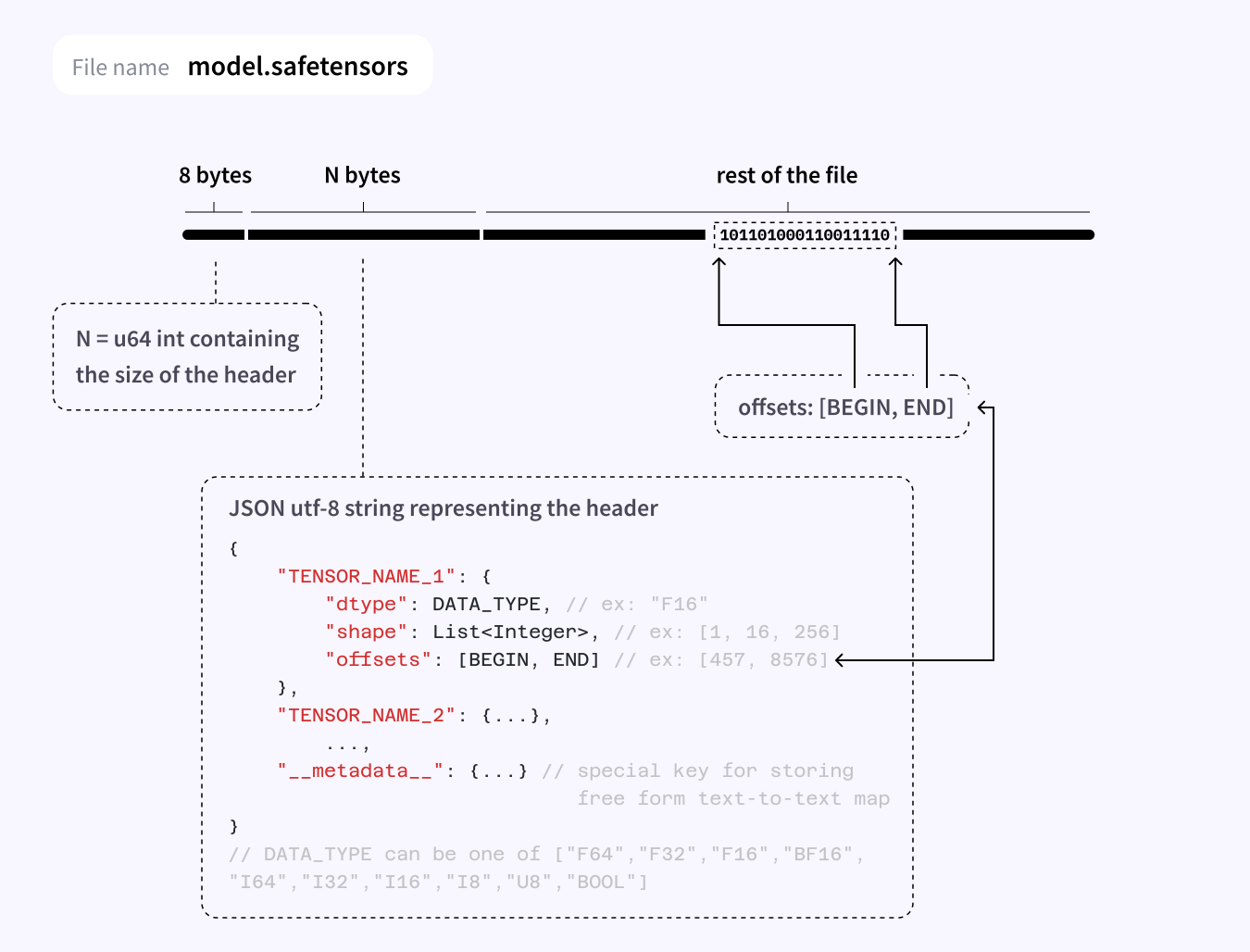
We can see that the format contains three parts:
- The first part contains 8 bytes = 64 bit unsigned integer to denote the number of bytes in the metadata section.
- The second part is the metadata format where we store the dictionary to denote the data type, shape and offets of each tensors in the model.
- And the final part is of course the part that contains the actual data for each tensors in the model.
Keras and TensorFlow world
On the other side, Keras (and TensorFlow) traditionally uses .h5 (HDF5) files. These are hierarchical, like a file system inside a file, and can store the full model—architecture, weights, optimizer state, and training config—in one convenient package.
.h5 is generally safer than pickle because it doesn’t execute arbitrary code during loading. It’s not perfect (older versions had some vulnerabilities), but it’s tightly coupled to TensorFlow/Keras and widely used.
Keras has moved toward the newer .keras format (a zip archive with JSON config and weights), but .h5 remains common for legacy compatibility.
ONNX: shared weights between any platforms
Then there’s ONNX (Open Neural Network Exchange)—the format that tries to make models framework-agnostic.
ONNX is an open standard that defines a common representation for neural networks. You can export a model trained in PyTorch, TensorFlow, or JAX into ONNX format (usually with a .onnx extension), and then run that same file in many different runtimes: ONNX Runtime, TensorRT, OpenVINO, TVM, and even in browsers via ONNX.js.
The big promise is portability. Train in PyTorch, export to ONNX, deploy on an edge device with ONNX Runtime, or optimize with NVIDIA TensorRT—all without rewriting the model.
What’s inside an ONNX file? It contains:
- The computational graph (operators, connections)
- The weights (tensors)
- Metadata about inputs/outputs, opset version, etc.
Because it’s a self-contained graph + weights format, it’s generally safe to load (no arbitrary code execution like pickle). However, the security depends on the runtime you use—some runtimes have had vulnerabilities in the past.
Trade-offs? Exporting to ONNX can be lossy. Not every custom operations or PyTorch-specific behavior survives the conversion perfectly. You often need to test carefully, especially for newer models or complex architectures.
Still, for many standard models (transformers, CNNs, diffusion models), ONNX export works very well and is increasingly supported by Hugging Face (via Optimum and the optimum.exporters.onnx module).
Once you have model weights stored in .onnx format, we can use a very useful website Netron App to render its computational graph for visualization of what is going on under the hood in the model. This is best for tracking the data flow in the model or to visualize the network architecture as a whole.
Comparison
Here’s how they stack up:
- Safetensors (.safetensors)
- Security: Excellent (no code execution possible)
- Speed: Very fast, zero-copy, memory-efficient
- Flexibility: Stores only tensors (architecture defined separately)
- Portability: mostly used with PyTorch + HF libraries. There is a library for safetensors to help you save and load it easily
- Best for: Sharing models publicly, fast inference loading
- PyTorch .pt / .pth (pickle)
- Security: Risky with untrusted files
- Speed: Slower due to extra copies and Python overhead
- Flexibility: Highest (can store anything)
- Portability: Only PyTorch
- Best for: Internal training checkpoints in trusted environments
- Keras .h5
- Security: Good (no arbitrary code execution)
- Speed: Decent, but not zero-copy
- Flexibility: Stores full model in one file
- Portability: Mostly TensorFlow/Keras ecosystem
- Best for: Keras/TensorFlow workflows
- ONNX (.onnx)
- Security: Generally good (depends on runtime)
- Speed: Depends on runtime (can be very fast with optimized engines)
- Flexibility: Stores graph + weights
- Portability: Excellent (runs on many runtimes and hardware)
- Best for: Deployment across frameworks, edge devices, production inference
When to choose what
If you’re sharing a model on Hugging Face or downloading from the internet, prefer safetensors when available. It’s safer and usually faster.
For your own research or training, .pt / .pth is still fine inside your trusted setup.
If you’re in the TensorFlow/Keras world, stick with .h5 (or .keras) unless you need cross-framework compatibility.
And if you want to deploy your model on diverse hardware, export to ONNX—it’s the closest thing we have to a universal model format today.
Final thoughts
Model formats might seem like a minor detail, but they sit right at the boundary between research and real-world deployment. The shift to safetensors made sharing safer and faster. ONNX made deployment more flexible. Together, they’re quietly changing how we think about open-source AI. With the interconnection nature between research groups and community interaction, public models are everywhere on HuggingFace, if you can come up with some ideas, perhaps there are already some models with pretrained weights sit on HF and wait for us to discover them. In this open research world like this, our main focus is no longer only on the performance of the model or the storage size but also the security when loading and using public models, that is the main reason safetensors format shine in this era.
In the end, the best format is the one that lets you focus on ideas instead of worrying about security holes, slow loading times, or “it only runs on my laptop.”
Welcome to the new era of model sharing—one tensor (and one graph) at a time.